Microsoft Excel workbook
Family Budget Operating System
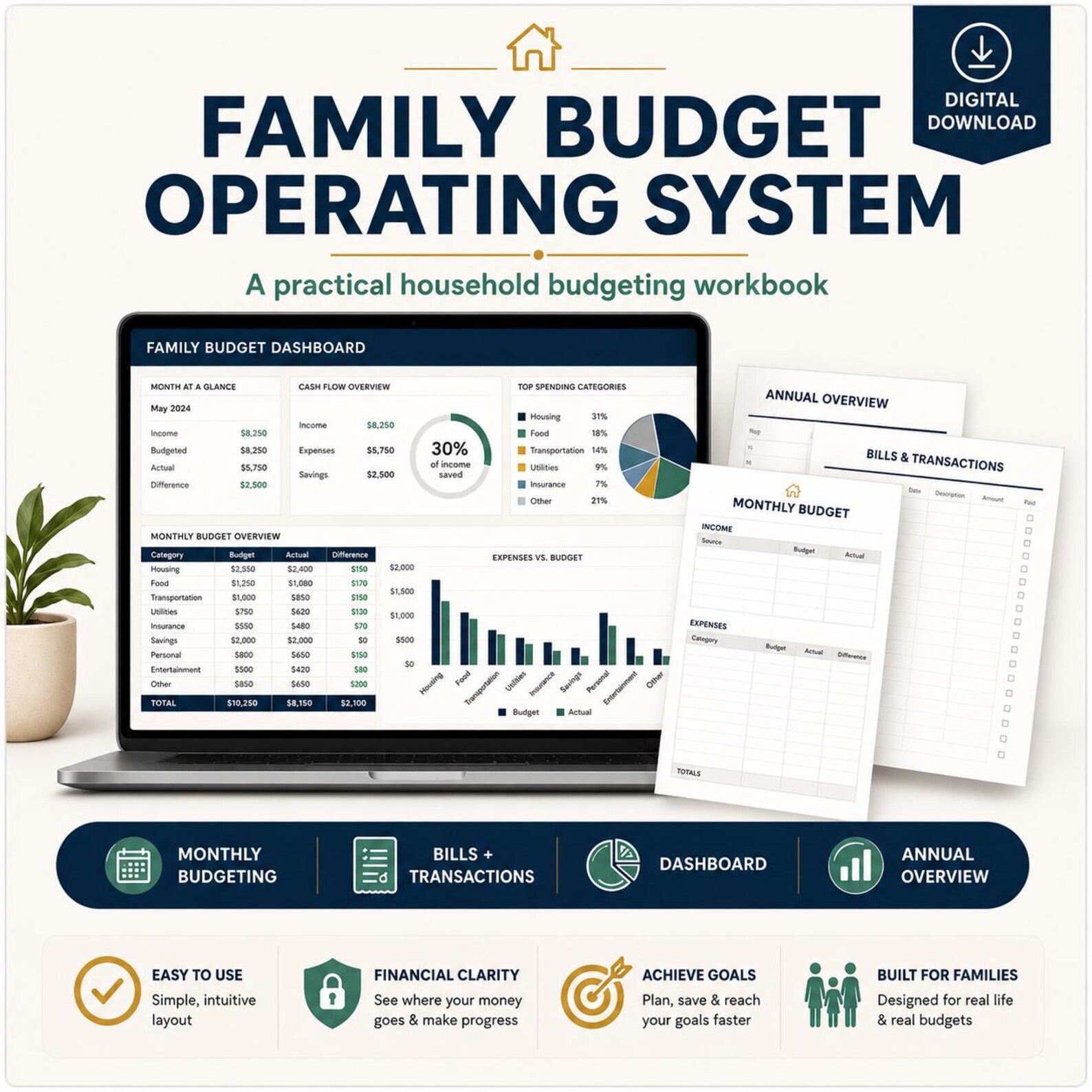
FBOS is a budgeting system built as a nine-sheet Excel workbook. You configure your starting details on Setup and Lists, plan the year, then record bills and transactions through the year. The Dashboard, Month-End Review, and Annual Overview read from what you enter.
- Sheets
- 9
- Planning span
- 12 months
- Format
- Excel
Availability
Available on Etsy
Family Budget Operating System is available now in the Formary Works Etsy shop.
- Format
- 9-sheet Excel workbook
- Sales channel
- Etsy
- Current price
- See Etsy listing
Purchase, payment, and file delivery are handled by Etsy, and the Etsy listing is the source of truth for current price. Family Budget Operating System is intended for Microsoft desktop Excel.
What's included
Nine sheets, each with a job
Every part of the workbook is listed here so you know exactly what you would be working in.
- Sheet 1
Start Here
- Sheet 2
Setup
- Sheet 3
Monthly Plan
- Sheet 4
Bills
- Sheet 5
Transactions
- Sheet 6
Dashboard
- Sheet 7
Month-End Review
- Sheet 8
Annual Overview
- Sheet 9
Lists
Monthly planning
Plan the year across five areas
The Monthly Plan supports planning across a full calendar year.
- Income
- Fixed bills
- Variable spending
- Savings
- Debt payments
Irregular income is handled by planning with conservative estimates and recording actual amounts as they arrive.
Bills and transactions
Two sheets for day-to-day records
Bills
Bill tracking includes:
- Due dates
- Planned amounts
- Actual amounts
- Paid/unpaid status
- Date paid
- Paid By
- Notes
Transactions
Transaction tracking includes:
- Income and expenses
- Date
- Description
- Category/source
- Amount
- Payment method
- Paid By
- Notes
Transactions are automatically assigned to the appropriate month based on the transaction date.
Dashboard and month-end review
See the month, then close it
Monthly Dashboard
- Opening balance
- Actual income
- Actual expenses
- Current balance
- Planned-versus-actual figures
- Bill status
- Category spending
Month-End Review
- Open / Closed / Upcoming month status
- Ending balances
- Savings
- Debt payments
- Reflection questions
Later months use the prior month's ending balance. Marking a month Closed changes its status from provisional to finalized rather than carrying the balance forward, and a closed month can be reopened for corrections.
Workbook formulas directly support Dashboard income and expense totals, balances, planned-versus-actual figures, bill status, savings and debt totals, and category spending.
Annual overview
The whole year on one sheet
The Annual Overview displays:
- Monthly and annual income
- Expenses
- Savings
- Debt payments
- Ending balances
- Month status
Customization
Make the lists yours
Values used by the dropdowns live on the Lists sheet. You can customize:
- Categories
- Income sources
- Payment methods
- Paid By names
- Other dropdown values
Paid By is informational: it records who paid, and does not calculate reimbursements.
Annual workflow
How a year runs, start to finish
- Step 1
Start Here and Setup
Read the orientation sheet, then enter your starting details and adjust the Lists values you want to use.
- Step 2
Plan the year
Use the Monthly Plan to lay out income, fixed bills, variable spending, savings, and debt payments for each month.
- Step 3
Record as you go
Log bills and transactions with dates, amounts, payment method, Paid By, and notes.
- Step 4
Check the Dashboard
Review opening balance, actual income and expenses, current balance, planned versus actual, bill status, and category spending.
- Step 5
Close the month
Complete the Month-End Review, note savings and debt payments, answer the reflection questions, and mark the month Closed to finalize its status.
- Step 6
Start the next year
One workbook covers one calendar year. Use a new copy for the following year.
Availability
Available on Etsy
The workbook content is established and its functionality has been inspected and documented — everything described on this page reflects what the workbook does.
Validation in native Microsoft desktop Excel has passed. FBOS is intended for Microsoft desktop Excel; we are not making claims about Google Sheets, Apple Numbers, mobile spreadsheet apps, or other spreadsheet software.
FBOS is available now in the Formary Works Etsy shop. Purchase, payment, and file delivery are handled by Etsy, and the Etsy listing is the source of truth for the current price.
Availability
Available on Etsy
Family Budget Operating System is available now in the Formary Works Etsy shop.
- Format
- 9-sheet Excel workbook
- Sales channel
- Etsy
- Current price
- See Etsy listing
Purchase, payment, and file delivery are handled by Etsy, and the Etsy listing is the source of truth for current price. Family Budget Operating System is intended for Microsoft desktop Excel.
FAQ
Questions about the workbook
- What exactly is the Family Budget Operating System?
- It is a Microsoft Excel workbook made up of nine sheets: Start Here, Setup, Monthly Plan, Bills, Transactions, Dashboard, Month-End Review, Annual Overview, and Lists. You use it to plan and record household income, bills, spending, savings, and debt payments.
- How much of the year does one workbook cover?
- One workbook is designed for a single calendar year, with planning across all twelve months. A new copy is intended for the next calendar year.
- Do I have to sort transactions into months myself?
- No. Transactions are assigned to the appropriate month based on the transaction date you enter.
- What happens when I finish a month?
- Later months use the prior month's ending balance. Marking a month Closed in the Month-End Review changes its status from provisional to finalized; it is not what carries the balance forward. A closed month can be reopened if you need to make corrections.
- Can I use my own categories and names?
- Yes. Categories, income sources, payment methods, Paid By names, and other dropdown values can be customized.
- What does the Paid By field do?
- Paid By is informational. It records who paid a bill or made a transaction and does not calculate reimbursements or split balances.
- My income varies month to month. Can I still use it?
- Yes. The workbook supports irregular income by letting you plan with conservative estimates and then record actual amounts as they arrive.
- Can I buy it now?
- Yes. FBOS is available in the Formary Works Etsy shop at https://formaryworks.etsy.com. The Etsy listing shows the current price. Purchase, payment, and file delivery are handled by Etsy.
Something not covered here? Visit Support.